Jellyfin is the best media server in 2026 if everyone watches at home, or if you will set up a VPN for anyone who doesn't. It is free, with nothing held back for a subscription, it matched 59 of our 60 badly named test files, and it has official apps on every kind of TV and box we checked except PlayStation. Pick Plex instead if you want to share with family in other homes or watch on trips without touching your router: by its own documentation it is the only one of the three that sets up an encrypted remote connection on its own, and it named all 60 files, but it needs an online account and a Plex Pass at $249.99 over five years. Emby sits between the two: free to run without an account and free on most TVs, with easier remote access than Jellyfin and a $119 lifetime pass for its phone apps and hardware transcoding.
Overall, Jellyfin scores 8.4, Emby 7.2 and Plex 6.9. Jellyfin's lead comes from cost and privacy, where Plex scores lowest; Plex wins watching away from home, apps and metadata. The weights decide the order between them: moving 9 of the 100 weight points from cost to watching away from home would put Plex first, and Emby leads Plex by less than a third of a point. If you will pay and you share outside your home, read Plex's section as the pick for you.
What each one costs in 2026
| Plex | Jellyfin | Emby | |
|---|---|---|---|
| Watching at home | Free | Free | Free in a browser and on Roku, Apple TV, Samsung and LG; phone apps need an unlock or Premiere |
| Watching your videos away from home | Plex Pass on the server, or a Remote Watch Pass for each viewer | Free | Free |
| Hardware transcoding | Plex Pass | Free | Premiere |
| Downloads to phones | Plex Pass | Free | Premiere |
| Monthly | $6.99 Plex Pass; $2.99 Remote Watch Pass | Free | $4.99 |
| Yearly | $69.99 Plex Pass; $29.99 Remote Watch Pass | Free | $54 |
| Five years, cheapest way | $249.99 (five-year Plex Pass) | Free | $119 (lifetime) |
| Lifetime | $749.99 | Free | $119 |
Plex's prices are from Plex's plans page and Emby's from Emby Premiere, both read on October 28, 2026. Plex raised its lifetime pass from $119.99 to $249.99 on April 29, 2025, and to $749.99 on July 1, 2026, when it added the recurring five-year pass at $249.99 (Plex's announcement). Emby Premiere covers one household, with a limit of 30 devices.
The biggest change is Plex's remote playback rule. Since April 29, 2025, watching your own videos from outside your home needs a Plex Pass on the server owner's account, or a Plex Pass or Remote Watch Pass on the viewer's own account. Plex started with its phone apps and has been adding platforms since: its support page lists the phone and computer apps, the web app, Roku, smart TVs, PlayStation and Xbox, and its April 29, 2026 update added Fire TV (requirements for remote playback, Plex's update). Neither list names Apple TV or Android TV and Google TV as of October 2026, but Plex says all its apps will eventually be covered, so don't plan around the gap. Remote music in Plexamp and remote photos stay free. Some AI answers still get this wrong: in our October 2026 sample, Gemini said Plex remote streaming is "completely free" on Roku and Fire TV, both of which Plex now lists. Plex's Remote Watch Pass also rose from an introductory $1.99 a month and $19.99 a year to $2.99 and $29.99 from June 1, 2026, and some pages AI answers cite still show the old price.
Emby works the other way round. Its server streams outside the home for free, and what Premiere unlocks is apps and features: the phone apps, the computer and console apps (which stop after one minute without it), hardware transcoding, downloads, live TV recording and skipping intros (Emby's feature matrix). The browser and the Roku, Apple TV, Samsung and LG apps play in full without paying, and so do the Android TV and Fire TV apps on up to five TV devices. One AI answer in our sample said Emby locks its smart TV apps behind Premiere; it doesn't.
Over five years, a household that wants remote streaming, hardware transcoding and phone downloads pays $249.99 for Plex, $119 for Emby and nothing for Jellyfin. If only one person watches remotely and you don't need hardware transcoding, a Remote Watch Pass on that person's account ($29.99 a year, $149.95 over five years) costs less than a five-year Plex Pass. With two or more remote viewers, a Plex Pass on your account is cheaper, and it covers everyone.
Watching away from home: Plex does it for you
Plex scores 10, Emby 4 and Jellyfin 1. This is the criterion where the three differ most.
- Plex tries to open your router automatically with UPnP or NAT-PMP when you turn on Remote Access (Plex's remote access guide). When that fails, as it does behind many internet providers' shared connections, apps fall back to Plex's relay, which needs nothing from you but is capped at 2 Mbps per stream for Plex Pass and Remote Watch Pass holders alike, and can't be used for downloads (Plex's relay article): enough for a phone, not for a sharp picture on a TV. Plex also gives each signed-in server its own certificate under plex.direct, so remote connections are encrypted without you buying a domain (Filippo Valsorda's write-up). Family members sign in to their own Plex account, find your server in the list, and sign a TV in by typing a short code at plex.tv/link.
- Emby has automatic router setup too, and its setup wizard turns it on by default. Signing in with a free Emby Connect account lets apps find your server without typing an address, and TV apps can be signed in by entering the PIN they show at emby.media/pin (Emby Connect, Emby's forum). Emby Connect only helps apps find the server; there is no relay, so if your router can't be opened, Emby can't be reached from outside. Encrypted connections need your own domain and certificate.
- Jellyfin leaves remote access to you. The Jellyfin 12.4 server we ran has no automatic router setup: the option is gone from its dashboard and the server ships no port-mapping code, although its configuration file still carries an unused setting for it. There is no relay, no central account, and no built-in HTTPS certificate. Jellyfin's own documentation recommends a reverse proxy or a VPN rather than exposing the server directly (Jellyfin networking docs). The one convenience it has is Quick Connect: a TV shows a short code that you approve from a device that is already signed in.
Of Jellyfin's two recommended routes, a VPN such as Tailscale is the simpler: install it on the server and on every phone, laptop or box outside the house. But it is something you set up and support for each person, and Roku, Samsung and LG TVs can't run a VPN app at all, so a relative watching on one of those needs a reverse proxy with your own domain instead.
Apps on your TV and phone
Plex scores 10, Jellyfin 9.2 and Emby 7.5. We counted official apps on 12 kinds of screen and whether they play your media at home without paying.
| Screen | Plex | Jellyfin | Emby |
|---|---|---|---|
| Web browser | Free | Free | Free |
| Windows and Mac | Free | Free | One minute per video without Premiere |
| iPhone and iPad | Free at home | Free | Needs an app unlock or Premiere |
| Android phone | Free at home | Free | Needs an app unlock or Premiere |
| Android TV and Google TV | Free | Free | Free |
| Amazon Fire TV | Free | Free | Free |
| Roku | Free | Free | Free |
| Apple TV | Free | Free (Swiftfin) | Free |
| Samsung TV | Free | Free | Free |
| LG TV | Free | Free | Free |
| Xbox | Free | Free | One minute per video without Premiere |
| PlayStation | Free | None | PlayStation 4: one minute per video without Premiere |
Sources: Plex's apps and devices and supported smart TVs, Jellyfin's client list and Emby's feature matrix, read on October 28, 2026. Plex says its apps are free for streaming on your home network (plans page); away from home they need a pass. Emby's free Android TV and Fire TV playback covers up to five TV devices.
We did not use the TV and phone apps ourselves, so this table counts which apps exist and what they allow, not how good they are. Two things the lists do show. Jellyfin's Apple TV app, Swiftfin, is labeled an official beta on Jellyfin's site. And Jellyfin's Samsung app has been in Samsung's TV app store since February 2026, for 2021 and later models running Tizen 6.0 or higher; older Samsung TVs need it installed by hand (Android Authority, SamMobile). Some AI answers still say it always needs sideloading.
Library test: 60 badly named files
Plex matched 60 of 60 files, Jellyfin 59 and Emby 56, which scores 10, 9.8 and 9.3. We made a library of 47 movie files and 13 TV episode files with the names people's files really have: clean "Title (Year)" names, release-style names such as The.Dark.Knight.2008.1080p.BluRay.x264-GROUP.mkv, films with no year, remakes that share a title (Dune 1984 and 2021, The Thing, Godzilla), accents (Amélie, Léon), numbers (1917, Se7en, 2001 A Space Odyssey), one file holding two Friends episodes, and an anime numbered by absolute episode. Each file was a distinct short clip, so the servers had only the names to go on. We decided the right answer for every file before the test, checked against Wikidata, and used each server's default settings for a new library.
| File | Plex | Jellyfin | Emby |
|---|---|---|---|
Blade Runner 2049 (2017).mkv |
Right | Blade Runner (1982) | Right |
WALL-E (2008).mkv |
Right | Right | A 2021 short about WALL-E's toys |
Star.Wars.1977.mkv |
Right | Right | The Making of Star Wars |
Battlestar Galactica (2003) - S01E01.mkv |
Right | Right | Right series, no episode title |
One Piece - 001.mkv |
Right | Right | Special No. 1 (an early OVA), not episode 1 |
Friends - S01E16-E17.mkv |
Both episodes | Both episodes | Both episodes |
| The other 54 files | Right | Right | Right |
Every server handled the release-style names, the missing years, the remakes and the accented titles. The misses came from numbers: Jellyfin probably read the "2049" in Blade Runner 2049 as a year, and Emby treated One Piece's episode 001 as the show's first special. Jellyfin also grouped our two cuts of Blade Runner (1982) into one film with two versions, which is what you want.
One correction to our own answer key: for the Battlestar Galactica file we first accepted only the 2004 series, but a file labeled 2003 fits the 2003 miniseries just as well, so we accepted either after seeing the first results. That moved Plex and Jellyfin up by one file each; with the original key the counts would be 59, 58 and 56, and the order the same. Our first check also marked Plex wrong on the two-episode Friends file, because our script read only the first of Plex's two listings for it (episode 17). Plex lists the file as both episodes 16 and 17, as the other two do, so we fixed the script and counted it right.
All three let you fix a wrong match by hand in a few clicks, so this score is about how much tidying a new library needs, not whether it can be fixed.
Transcoding test
Emby and Jellyfin score 9.8 and Plex 9.0. Transcoding is what a server does when a TV or phone can't play a file as it is, or a remote connection is too slow for it: it converts the video on the fly, which takes a lot of processing power when no graphics chip helps. We asked each server for three conversions with its default settings on our 4-core machine with no graphics card, downloaded the result as fast as the server produced it for 60 seconds or to the end of the clip, and ran each test three times.
| Conversion | Plex | Jellyfin | Emby |
|---|---|---|---|
| 4K HEVC 10-bit to 1080p H.264 (Big Buck Bunny) | 2.70x | 2.75x | 2.81x |
| 1080p H.264 to 720p, English subtitles burned in (Sintel) | 8.35x | 9.51x | 8.89x |
| 1080p HEVC to 1080p H.264 (Tears of Steel) | 9.32x | 9.23x | 9.72x |
| Time to the first piece of video (median per test) | 0.8 to 1.4 seconds | 1.0 to 2.9 seconds | 0.9 to 1.9 seconds |
Speeds are seconds of video produced per second, the median of three runs; 2.7x means a two-hour film would convert in about 45 minutes, which in theory leaves room for about two converted 4K streams at once on this machine (we ran one at a time). The three runs of each test were within 7% of each other, and every output was H.264 at the size we asked for, with the subtitles drawn into the picture on the Sintel test.
The three are close because all three convert with the same kind of software: each ran the x264 encoder at its "veryfast" setting. Plex was 12% slower than Jellyfin on the subtitle test and Emby 7% slower; every other result was within about 5% of the fastest. Plex also encoded at a higher quality setting on the subtitle test (x264's CRF 21 against 23), which costs speed, and its output used more data on the 4K test, 4.6 Mbps against about 3.4 Mbps.
The bigger difference is graphics-chip (hardware) transcoding, which is much faster and the reason people buy a mini PC with an Intel processor for this. Jellyfin supports Intel, NVIDIA and AMD graphics for free (Jellyfin's docs). Emby supports all three with Premiere (Emby's overview), and Plex supports Intel and NVIDIA with Plex Pass, with AMD "as is" (Plex's article). We couldn't test hardware transcoding on a machine without a graphics card.
Setup, accounts and privacy
Jellyfin scores 10, Emby 8 and Plex 1.
We set up all three from scratch in October 2026. Jellyfin's setup wizard took six screens: language, an admin user, libraries, metadata language, remote access and done. Emby's also took six: language, an admin user, libraries, remote access (router setup already ticked), terms of use and done. Neither asked for an email address or an online account, and both fetched posters and titles without one.
Plex's web app sent us to a sign-in page (Google, Apple or email) before showing anything, with no way to skip it. The server itself fetched metadata without an account, which is how we ran the library test, but there is no supported way to use Plex day to day without signing in.
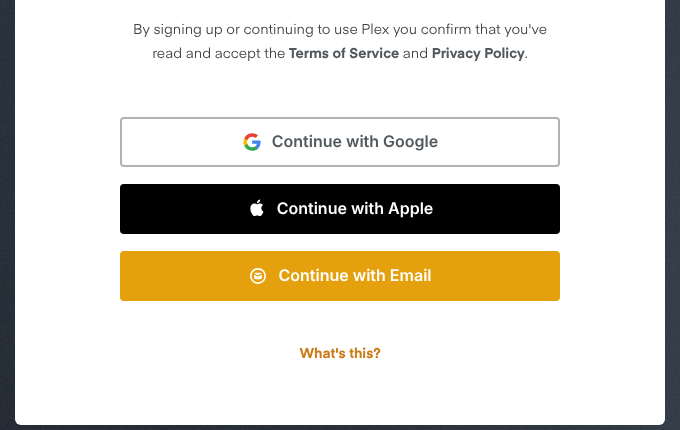
What opening a new Plex Media Server showed us, October 2026. Cropped to remove a sign-in alert that showed our test machine's IP address.
The other differences:
- Source code. Jellyfin is open source, a 2018 fork of Emby made when Emby closed its code. Plex and Emby are closed.
- Home screen. Plex's apps put its own free, ad-supported movies, shows and live TV alongside your libraries. You can turn those off under Online Media Sources in your Plex account settings (Plex's free live TV guide), though one user reported in 2026 that live TV stayed on a Roku after they did (Plex forum). Jellyfin's and Emby's home screens show only your libraries, plus Emby's "Get Emby Premiere" button.
- What the server sends home. Plex's privacy policy lists data it collects from your server, from library and configuration data to optional playback data you can opt out of, and says it shares some activity data with advertising partners. Jellyfin says it has no tracking and no central servers (jellyfin.org). Emby removed usage reporting from its server in version 4.0 in 2019 (Emby's announcement). We also recorded which internet names each server looked up in the five minutes after a restart, with nobody using it. Plex, never signed in, looked up servers.plex.tv, meta.plex.tv and analytics.plex.tv among others. Jellyfin looked up only its plugin repository. Emby looked up its own back end (mb3admin.com), a service that reports your public IP address, and GitHub. The traffic is encrypted, so this shows who each server talks to, not what it sends.
- When the internet is down. Jellyfin and Emby use accounts stored on your own server, so playback at home doesn't depend on anyone else's service. We cut Jellyfin and Emby off from the internet and both still signed in and played. Plex says most things keep working through a short outage because apps cache their connection, but that its Apple TV, Android TV, Fire TV, most smart TV, PlayStation and Xbox apps need an internet connection to use (Plex's network requirements). We didn't test Plex offline.
Plex has also had security incidents in which account data was taken, most recently in September 2025, when it asked users to reset their passwords (TechCrunch). We didn't score this, but it is part of what an online account means.
The three, scored
Jellyfin
Jellyfin ranks first of the three (8.4) and suits households that watch at home, or that will set up a VPN or reverse proxy for watching away: it is free and open source, with hardware transcoding, downloads and live TV included, it matched 59 of our 60 test files, and it needs no account and sends no usage data. Its apps cover 11 of the 12 kinds of screen we checked, including Roku and Samsung and LG TVs; PlayStation is the gap. Its weak spot is watching away from home: no relay, no automatic router setup and no built-in HTTPS, so you set up a VPN such as Tailscale or a reverse proxy yourself.
Emby
Emby ranks second (7.2) and suits people who want Jellyfin's no-account setup with easier remote access: its setup turns on automatic router setup, a free Emby Connect sign-in lets apps find the server, and TVs sign in with a PIN, though there is no relay and no built-in HTTPS. The browser and the Roku, Apple TV, Samsung, LG, Android TV and Fire TV apps play in full without paying, and a $119 lifetime Premiere covers the household. Its phone apps need an unlock or Premiere even at home, its computer and console apps stop after a minute without Premiere, and it misnamed four of our 60 test files.
Plex
Plex ranks third (6.9) but is the easiest of the three for a household that watches away from home or shares with family elsewhere: its relay and automatic HTTPS make remote access work without router changes, it has free apps at home on all 12 kinds of screen we checked, and it was the only one to name all 60 of our test files. Watching your videos remotely, hardware transcoding and downloads need a Plex Pass ($249.99 for five years or $69.99 a year) or a Remote Watch Pass for each viewer, its setup screen requires a Plex account, and home screens show Plex's free movies and live TV by default.
Which one should you choose?
- You won't pay anything: Jellyfin. Nothing in it is locked.
- Family in other homes will watch your library, and nobody wants to set up a VPN: Plex, with a Plex Pass on your account so they don't each need a Remote Watch Pass.
- You only watch at home on a TV: Jellyfin, Emby or Plex, all free for this. Jellyfin if you don't want an account; Plex if you'll accept one for its apps and file matching.
- You have a PlayStation: Plex. Jellyfin has no PlayStation app, and Emby's PlayStation 4 app stops after a minute without Premiere.
- You care most about privacy and owning the whole setup: Jellyfin.
- You already have a Plex lifetime pass: Stay on Plex. The pass you bought covers everything that now costs extra.
- You want hardware transcoding on a cheap mini PC: Jellyfin, where it is free. Plex and Emby charge for it.
- You're not sure: Run Jellyfin and Plex side by side on the same folders for a week. They don't get in each other's way.
How we tested
We ran Plex Media Server 1.43.5, Jellyfin 12.4.0 and Emby Server 4.10.2 in their official Docker images on October 28, 2026, on a Linux cloud machine with 4 virtual CPUs, 15 GB of memory and no graphics card. Each server got the same read-only library of 60 files for the metadata test: 57 short placeholder clips with real-world file names and three open movies from the Blender Foundation (Big Buck Bunny, Sintel and Tears of Steel), which we also used for the transcoding test. We set up Jellyfin and Emby through their own setup wizards and added libraries through their web interfaces with default settings. Plex we ran without signing in, adding libraries with its default agents through its programming interface on the machine itself, which no ordinary user would do. We wrote the criteria, weights and scoring rules before running any test, and the scoring sheet shows them with the evidence for every score.
Prices, app lists, remote access and privacy terms come from each company's own pages, read the same day. What we didn't test: the TV and phone apps, hardware transcoding (the machine has no graphics card), and remote access over a real home internet connection. A cloud machine has no home router to open, so the remote access scores rest on each server's documentation and settings, not on a trip outside the house.
Questions people ask
Do I need Plex Pass to watch my own media outside my home? For video, yes: since April 2025 you need either Plex Pass on the server owner's account or a Remote Watch Pass ($2.99 a month or $29.99 a year) on each viewer's account. It covers phones, computers, the web app, Roku, smart TVs, consoles and Fire TV. As of October 2026 Plex's lists don't include Apple TV or Android TV and Google TV, but Plex says every app will follow, so don't plan around it. Remote music in Plexamp and remote photos are still free.
Which is easiest for non-technical family members? Plex. Relatives sign in to a free Plex account, your server shows up in their app, and a TV signs in with a code at plex.tv/link; with a Plex Pass on your account they pay nothing. Turn off Online Media Sources if you want their home screen to show only your library. Emby comes next: Emby Connect finds the server and TVs sign in with a PIN, but there is no relay if your router can't be opened. Jellyfin needs you to set up a VPN or reverse proxy, and Roku, Samsung and LG TVs can't run a VPN.
Do I need Emby Premiere to watch outside my home? No. Emby streams outside the home for free in a browser and on its free TV apps. You need Premiere or an app unlock for its phone apps, at home or away, and for hardware transcoding and downloads.
Is Jellyfin really free? Yes. There is no paid tier: hardware transcoding, downloads, live TV and every official app are free. The project runs on donations.
Can they record live TV? All three can with a TV tuner such as an HDHomeRun. Live TV and recording are free in Jellyfin, need Plex Pass in Plex and need Premiere in Emby (Plex free vs paid, Emby's feature matrix). Skipping intros is also a Plex Pass and Premiere feature.
Can Plex, Jellyfin and Emby use the same media folders? Yes. We ran all three at once on one read-only copy of our library, and each built its own library from it. Watch history doesn't carry over between them without a third-party tool.
Is Plex still worth it in 2026? If you share with people outside your home and want it to work without router changes, yes, and a five-year pass at $249.99 is the cheapest way to cover a whole household. If everyone watches at home, Jellyfin does the same job for free.
How the score is built
Weighted average of the criteria below, out of 10
- Apps and devices 25%
- Official apps on 12 kinds of screen, from a browser and phones to Roku, Fire TV, Apple TV, Samsung and LG TVs, Xbox and PlayStation. 1 point when the app plays your media at home for free, 0.5 when that needs a payment, 0 with no official app; points out of 12, scaled to 10.
- Cost 25%
- The lowest US price over five years for remote streaming for the whole household, hardware transcoding and phone downloads, from each company's pricing page. 10 minus the price divided by 30, so free scores 10 and $300 or more scores 0.
- Watching away from home 15%
- A 10-point checklist once any payment is made. A relay that works when router ports can't be opened (3), automatic router setup (2), encrypted connections out of the box (3), apps that find the server through a sign-in (1), and TV sign-in with a short code (1).
- Library and metadata 15%
- How many of our 60 test files (47 movies, 13 episodes, named the way real files are) each server matched to the right film or episode with its default settings, out of 60, scaled to 10.
- Transcoding 10%
- Up to 7 points for software transcoding speed on three test files, against the fastest server (median of three runs each), and up to 3 for documented hardware transcoding on Intel, NVIDIA and AMD graphics.
- Setup and privacy 10%
- A 10-point checklist. No online account needed (3), metadata without an account (1), open source (2), a home screen with only your own media (1), a stated policy of sending no usage data (2), and local playback that works when the internet is down (1).
| Tool | Apps and devices25% | Cost25% | Watching away from home15% | Library and metadata15% | Transcoding10% | Setup and privacy10% | Score |
|---|---|---|---|---|---|---|---|
| Jellyfin | 9.2 | 10.0 | 1.0 | 9.8 | 9.8 | 10.0 | 8.4 |
| Emby | 7.5 | 6.0 | 4.0 | 9.3 | 9.8 | 8.0 | 7.2 |
| Plex | 10.0 | 1.7 | 10.0 | 10.0 | 9.0 | 1.0 | 6.9 |
Also considered: 6 tools we left out
- Kodi
- Came up in most AI answers, but it is a media player for one screen, not a server that streams to the rest of the house and outside it. It can use Jellyfin, Emby or Plex as its library.
- Infuse
- Recommended in AI answers for Apple TV, but it is a player app that connects to Plex, Jellyfin or Emby, not a server.
- Channels DVR
- Came up once in AI answers. It is built around recording live TV, at $8 a month, and is a different job from serving your own films and shows.
- Plexamp and Navidrome
- Music only. Plexamp is Plex's music app, and Navidrome is a music server.
- Serviio and Universal Media Server
- DLNA servers that play files on TVs at home, without the apps, accounts and remote access this question is about.
- Stremio
- Came up in a page an AI answer cited, but it is an app for streaming add-ons, not a server for your own files.