pnpm is the best JavaScript package manager for most projects and teams in October 2026. In our tests on three real projects it was never more than 4 seconds behind the fastest install, its defaults were the strictest we tested (undeclared imports, unreviewed install scripts and day-old releases are all blocked), and its monorepo tooling is close to complete. Pick Bun instead if install speed is what you care about most: it was the fastest in seven of our nine timed scenarios and installed a 1,178-package Docusaurus site in 4.5 seconds with no cache, against 107 seconds for npm.
Yarn 4 has the most complete monorepo tooling but was slow to install without a warm cache, and its default Plug'n'Play mode broke our Next.js build. npm comes with Node.js, but as npm 10 or 11, which still run dependency install scripts by default; npm 12, a separate upgrade, blocks them. npm was the slowest in almost every test.
Install times on three real projects
We installed three unmodified project templates with each tool, five times per scenario, on a 4-core Linux machine in October 2026: a Vite and React starter (about 30 packages), a Next.js 16 starter (about 360) and a Docusaurus 3.10 site (1,171 to 1,295, depending on the tool). The table shows the median of five runs, in seconds. Install scripts were skipped for every tool so each one did the same work; the defaults section shows what happens when they are not.
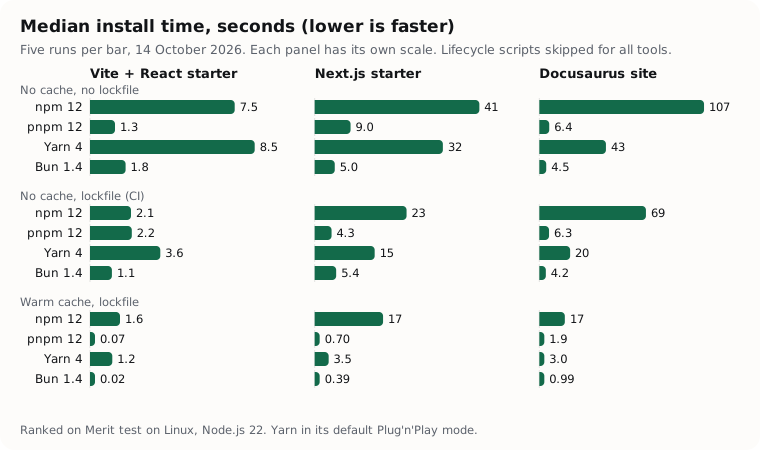
| Project and scenario | npm 12 | pnpm 12 | Yarn 4 | Bun 1.4 |
|---|---|---|---|---|
| Vite, no cache, no lockfile | 7.48 | 1.29 | 8.52 | 1.84 |
| Vite, no cache, lockfile | 2.12 | 2.16 | 3.64 | 1.13 |
| Vite, warm cache, lockfile | 1.55 | 0.07 | 1.16 | 0.02 |
| Next.js, no cache, no lockfile | 41.36 | 9.02 | 32.21 | 5.04 |
| Next.js, no cache, lockfile | 23.09 | 4.25 | 15.08 | 5.40 |
| Next.js, warm cache, lockfile | 17.18 | 0.70 | 3.50 | 0.39 |
| Docusaurus, no cache, no lockfile | 106.78 | 6.43 | 43.16 | 4.48 |
| Docusaurus, no cache, lockfile | 69.13 | 6.28 | 19.97 | 4.18 |
| Docusaurus, warm cache, lockfile | 16.56 | 1.87 | 3.03 | 0.99 |
| Docusaurus, install again, nothing changed | 4.67 | 0.02 | 1.77 | 0.04 |
All timings are on Linux. On macOS, pnpm and Bun clone files instead of hard-linking them, so absolute times and disk use there may differ.
"No cache, lockfile" is a CI job without a cache (npm ci, pnpm install --frozen-lockfile, yarn install --immutable, bun install --frozen-lockfile); "warm cache, lockfile" is the same job with the cache restored and node_modules deleted. Yarn ran in its default Plug'n'Play mode. With nodeLinker: node-modules it was slower: 50.04 seconds for Docusaurus with no cache and no lockfile, and 8.79 seconds with a warm cache.
Network speed varied during the run. A probe before each round downloaded a 4.4 MB tarball at a median of 35 MB a second, but three of 60 probes fell below 5 MB a second, which is why a few single runs were much slower than the rest (the scoring sheet lists the fastest and slowest run behind every median). The medians held their order across runs: Bun and pnpm were within 4 seconds of each other everywhere, Yarn took 1.7 to 9.6 times as long as them without a warm cache, and npm was slower still.
The best JavaScript package managers, ranked
pnpm
pnpm 12 is our No. 1 for most projects and teams because it pairs near-top speed with the strictest defaults of the four. On the Docusaurus site it installed in 6.43 seconds with no cache and no lockfile, against 4.48 for Bun, 43.16 for Yarn and 106.78 for npm. It beat Bun outright in two scenarios (the small Vite project with no lockfile, and the Next.js app from a lockfile with no cache), and once everything was installed, running pnpm install again took 0.02 seconds. Bun was faster in the other seven: by 1.4 to 1.9 times in the five where both took more than half a second, a difference of under 4 seconds on our projects, and by 0.05 and 0.31 seconds in the two warm-cache cells where Bun finished in under half a second.
pnpm's strongest scores are correctness and security, both full marks. Its default isolated node_modules made our undeclared import of debug (a dependency of Express, not of the project) fail in CommonJS and ESM alike. It skips versions published in the last day (minimumReleaseAge defaults to 1,440 minutes since pnpm 11), refuses git and tarball sources for transitive dependencies (blockExoticSubdeps), and re-checks lockfile entries against those policies before a frozen install. On the small Vite project that check took about 1 second, which is why pnpm was slower there from a lockfile than without one (2.16 seconds against 1.29).
The catch is the first install, and it is pnpm's weakest score (compatibility, 7 out of 10). pnpm blocks dependency build scripts and, by default, exits with an error when one is waiting for approval (strictDepBuilds is on). Our Next.js and Docusaurus installs both stopped with ERR_PNPM_IGNORED_BUILDS until we ran pnpm approve-builds, which records the approvals in pnpm-workspace.yaml; both then built. That costs a minute once per project, and it is also the protection working. The second catch is configuration: pnpm 12 reads only auth and registry settings from .npmrc, and settings such as nodeLinker live in pnpm-workspace.yaml, so older advice to put node-linker=hoisted in .npmrc no longer applies.
For monorepos pnpm has the workspace: protocol, recursive runs in dependency order (our fixture built lib-a before app-b), graph filters such as --filter app... and catalogs for shared versions. It lacks Yarn's built-in constraints, the one point it dropped.
Bun
Bun 1.4 is No. 2 and the fastest installer we tested: fastest or joint fastest in seven of nine timed scenarios, and under 1 second for every project once its cache was warm (0.99 seconds for Docusaurus, 0.39 for Next.js). For a CI job without a cache it installed Docusaurus from its lockfile in 4.18 seconds, against 6.28 for pnpm, 19.97 for Yarn and 69.13 for npm. It also used the least disk for two copies of a project on two of our three projects, because on Linux it hard-links packages from its cache. You do not need the Bun runtime to use it: bun install and bun run build worked on all three of our Node.js projects.
Bun's weakest score is security defaults. Bun blocks dependency install scripts, but its documentation says it runs them without asking for a curated list of popular packages, so the trust decision for those packages is Bun's, not yours. In our fixture with three packages that have install scripts, Bun reported two as blocked (core-js and unrs-resolver) and ran none: esbuild, which is on Bun's default list, was neither reported nor run. Bun has a release-age gate only if you set minimumReleaseAge: in our test it installed react 19.3.1 about 4 hours after release, where pnpm and Yarn chose 19.3.0. We found no documented default restriction on git or tarball dependencies.
Strictness depends on the project. In a single-package project Bun's default is a hoisted node_modules like npm's, and our undeclared import worked; in a new workspace it defaults to isolated installs, and bun install --linker isolated made the same import fail. One more thing to know: on our glibc Linux machine Bun installed both the glibc and musl builds of Next.js's compiler and of sharp, where npm 12 and pnpm installed only the glibc ones, which made Bun's Next.js node_modules 631 MB, against 491 MB for pnpm and 498 MB for npm.
The choice between pnpm and Bun is close. Their totals are 9.0 and 8.6, and pnpm's lead comes from security defaults, where it scores 10 against Bun's 5, worth 0.75 points of the total. Moving 5 of the 100 weight points from security defaults to compatibility, or 6 to install speed, would put Bun first; without the 0.5-second floor described under How we tested, 2 points would. If you set Bun's minimumReleaseAge, the main difference left is who decides which packages may run install scripts.
Yarn
Yarn 4 is No. 3. It has the most complete monorepo tooling we tested, the only one with built-in constraints that enforce rules across workspaces, plus focused installs, catalogs (built in since Yarn 4.10) and yarn workspaces foreach -t for dependency order. Its defaults are strict too: Plug'n'Play made our undeclared import fail, and according to Yarn's security page it has not run dependency postinstall scripts by default since 4.14 and skips versions under one day old since 4.12. Our fixtures confirmed both.
Yarn's weakest score is speed. With no cache it took 43.16 seconds for Docusaurus without a lockfile and 19.97 with one, against 4 to 6 seconds for Bun and pnpm. With a warm cache it was much closer (3.03 seconds). Plug'n'Play was faster than Yarn's node-modules mode in every scenario, and it was the smallest single installed copy of Docusaurus (345 MB with its cache, against 435 MB or more for the others).
The friction is Plug'n'Play compatibility. Our Next.js 16 build failed under Plug'n'Play with "Could not find the Next.js package" and passed after we set nodeLinker: node-modules; editors need Yarn's SDKs for TypeScript to resolve packages; and plain node cannot run a script without Yarn's loader. Yarn also does not install a missing peer dependency: with react-dom and no react, it warned and left a react-dom that failed to load, where the other three installed react for us.
npm
npm 12 is No. 4. Every one of our projects built with its defaults, and npm 12 is much safer than earlier versions: it blocks dependency install scripts until you approve them with npm install-scripts approve, and refuses git and remote tarball dependencies by default. It was also the strictest about peers: it refused our react-dom 19 with react 18 (ERESOLVE) instead of installing a tree that does not satisfy react-dom.
The catch is that npm 12 is not the npm you already have. No Node.js release bundles it yet: in October 2026, Node.js 26.12.0 comes with npm 11.20.0, Node.js 24 LTS with npm 11.19.1 and Node.js 22 with npm 10.9.9, according to the Node.js release index. Those versions still run dependency install scripts by default: npm 10 ran all three in our fixture, and npm 11's script policy is opt-in. Getting npm 12 is a one-line upgrade, npm install -g npm@12, on Node.js 22.22.2 or later in the 22 line, 24.15.0 or later in the 24 line, or 26 and later. That separate install is why npm scores 9 for compatibility rather than 10.
npm's weakest scores are speed (0 out of 10) and workspaces (1). It was the slowest of the four in seven of our nine scenarios: 106.78 seconds for Docusaurus with no cache and no lockfile, 69.13 from a lockfile, and 16.56 to reinstall from a warm cache, where pnpm and Bun took under 2 seconds. npm 12 ran on Node.js 22.22.0, a patch release it does not support, so we also timed npm 10.9.4, the npm bundled with that Node.js: it was just as slow, at 100.60 seconds for Docusaurus with no cache and no lockfile, and would also score 0 for speed. npm unpacks every package into each project, so a second copy of Next.js added 498 MB, against 15 MB for pnpm and 9 MB for Bun. Its one close result was the small Vite project from a lockfile (2.12 seconds, level with pnpm).
Workspaces are basic. npm does not support the workspace: protocol (our fixture failed with EUNSUPPORTEDPROTOCOL), npm run build --workspaces runs packages in the order they are listed rather than in dependency order (it built app-b before the lib-a it depends on), and there are no catalogs or graph filters. The strict layout is there if you want it: --install-strategy=linked, stable since npm 12, made our undeclared import fail.
What each tool does by default
These are the results of our fixtures with no configuration at all, in October 2026, except where a cell says it comes from documentation. The fixtures use well-known packages from the public registry.
| Test | npm 12 | pnpm 12 | Yarn 4 | Bun 1.4 |
|---|---|---|---|---|
| Importing a package you did not declare | Works | Fails | Fails | Works (fails in workspaces) |
| Dependency install scripts (esbuild, core-js, unrs-resolver) | Blocked, with a warning | Blocked; install exits with an error | Blocked, with a warning | Two reported as blocked, none ran; documented allowlist runs without asking |
| Versions published in the last 24 hours | Installed | Skipped | Skipped | Installed |
| react-dom 19 with react 18 | Install fails | Warning | Warning | Warning |
| react-dom with no react | react installed | react installed | Warning; react-dom cannot load | react installed |
| Frozen install after editing package.json | Fails | Fails | Fails | Fails |
workspace:* dependency |
Not supported | Supported | Supported | Supported |
| Workspace scripts in dependency order | No | Yes | Yes | Yes |
The big change since most comparisons were written is the second row. Dependency install scripts used to run by default in npm and Yarn; as of npm 12 (July 2026), pnpm 10 and Yarn 4.14, all four block them, apart from the allowlist Bun documents. The npm that comes with Node.js is still npm 10 or 11, which run them: npm 10 ran all three in our fixture. The practical effect: a package that needs its postinstall step, usually to fetch or build a native binary, has to be approved once per project in every tool. None of our three projects needed one to build.
Disk use
For one project, the four tools used roughly the same disk once their caches are counted: 626 to 644 MB for the Next.js app with npm, pnpm and Bun, and 621 MB with Yarn. The difference shows up with the second project. pnpm and Bun hard-link from one store, so a second copy of the Next.js app added 15 MB and 9 MB; npm added 498 MB and Yarn's Plug'n'Play 147 MB (the packages it has to unpack into each project). These are Linux numbers; on macOS pnpm and Bun clone files instead.
| Two copies of a project plus the cache | npm 12 | pnpm 12 | Yarn 4 | Bun 1.4 |
|---|---|---|---|---|
| Vite | 210 MB | 140 MB | 223 MB | 137 MB |
| Next.js | 1,125 MB | 659 MB | 769 MB | 651 MB |
| Docusaurus | 888 MB | 491 MB | 426 MB | 480 MB |
Which one should you choose?
- Starting a new project or monorepo with a team: pnpm. You get speed close to Bun's, safe defaults and the best balance of workspace features, and the first-install approval step takes a minute.
- CI minutes or developer wait time are what hurt: Bun. It was the fastest in most of our tests, and you can use it only as the installer while your app keeps running on Node.js. Set
minimumReleaseAgeinbunfig.tomland review its allowlist if supply-chain risk matters to you; then the gap to pnpm is mostly about who approves install scripts. - A large monorepo that needs enforced rules (one version of React everywhere, required fields, banned packages): Yarn 4, for constraints. Consider
nodeLinker: node-modulesif your framework or tools struggle with Plug'n'Play, as Next.js 16 did for us. - A small project or a tutorial: npm. It is already there. If you can, upgrade it with
npm install -g npm@12(Node.js 22.22.2, 24.15.0 or 26 and later), because the npm 10 or 11 that comes with Node.js still runs dependency install scripts. Switch when installs start costing you time; on our Next.js app pnpm was about 5 to 25 times faster. - A machine where you cannot install or upgrade tools: the bundled npm is what you have, so treat new dependencies with care: unlike npm 12, it runs their install scripts without asking.
- An existing project that works: keep its package manager unless installs or phantom dependencies are a real problem. Switching means a new lockfile and slightly different resolved versions to test.
What AI answers and popular comparisons get wrong
We asked GPT, Claude, Gemini and Perplexity models four versions of this question through their APIs in October 2026 (16 answers; the questions are listed in the scoring sheet). Most recommend pnpm, which matches our result. These are the claims our tests contradict:
- Bun as the only one that holds back install scripts. One answer called Bun not running dependency lifecycle scripts "a meaningful behavioral difference". In our tests npm 12, pnpm 12 and Yarn 4 all blocked dependency install scripts by default too. Bun's documentation says it runs scripts for packages on its built-in allowlist without asking; in our fixture it reported two of three as blocked and ran none. None of the 16 answers mentioned npm 12's change, and none noted that the npm bundled with Node.js is still npm 10 or 11.
- Bun always hoists. One answer said Bun "uses hoisted
node_modules(like npm), meaning it does not prevent phantom dependencies by default". That is true for single-package projects and false for new workspaces, where Bun defaults to isolated installs. - pnpm as a drop-in replacement. One answer called pnpm a "safe, drop-in replacement" for npm that "guarantees 100% Node.js compatibility". pnpm's default first install failed on two of our three projects until we approved build scripts. It is a short, documented step, but it is not drop-in.
- Fixing pnpm with
.npmrcsettings. One answer suggested "node-linker=hoistedor.npmrcadjustments" for packages that break under pnpm. pnpm 12 reads only auth and registry settings from.npmrc; the setting is nownodeLinker: hoistedinpnpm-workspace.yaml. - Bun fastest "by a wide margin". Over npm and Yarn, yes: 44 times faster than npm on the Next.js app with a warm cache. Over pnpm, the margin on our projects was under 4 seconds, and pnpm was faster in two scenarios.
- Vendor benchmarks as evidence. The Bun package manager page compares Bun with Yarn 1.22.22 (Yarn Classic) and pnpm 11, not the current Yarn 4 and pnpm 12. pnpm's benchmarks compare pnpm with npm only. Neither is wrong about what it measured, but neither answers "npm vs pnpm vs Yarn vs Bun" today.
Questions people ask
Can I use Bun's package manager without the Bun runtime?
Yes. We installed and built a Vite app, a Next.js app and a Docusaurus site with bun install and bun run build, and the builds ran on Node.js. Bun reads package.json and .npmrc, and it can migrate an npm, pnpm or Yarn lockfile to bun.lock (Bun install docs).
Should I switch from npm to pnpm?
If installs or phantom dependencies cost you time, yes. On our Next.js app pnpm was 5.4 times faster than npm from a lockfile with no cache and 25 times faster with a warm cache. Expect to approve build scripts once and to add any dependencies your code imports without declaring them, which pnpm's strict layout will surface.
Is Yarn Classic still maintained?
Only for maintenance releases. Yarn 1.22.22, the last one, came out in March 2024, and the yarn package on npm stays on 1.x for that reason; current Yarn is installed through Corepack or yarn set version, according to Yarn's docs. Corepack is no longer bundled with Node.js 25 and later, so on current Node.js it is a separate install too. Moving to Yarn 4, pnpm or npm is a planned migration, not a version bump.
Why did my install fail with ERR_PNPM_IGNORED_BUILDS, or warn about install scripts?
Because a dependency has a postinstall or install script that has not been approved. Run pnpm approve-builds (pnpm), npm install-scripts approve <package> (npm 12), list the package under dependenciesMeta in package.json, as Yarn's security page describes (Yarn), or add it to trustedDependencies in package.json (Bun). Approve only packages that need it; none of our three projects did to build.
Does npm 12 need a newer Node.js?
Yes, and it does not come with any Node.js release yet. npm 12.2.0 supports Node.js 22.22.2 or later on the 22 line, 24.15.0 or later, and 26 or later; Node.js 26 and 24 come with npm 11, and Node.js 22 with npm 10 (Node.js release index), so you upgrade with npm install -g npm@12. Our test machine had Node.js 22.22.0, so npm warned on every command; every install still completed. As a check we also ran npm 10.9.4, the npm bundled with Node.js 22, in every scenario: npm 12 was level with npm 10 or up to 18% slower on the Next.js and Docusaurus projects, and faster on the Vite project. We cannot tell whether the unsupported Node.js version explains the difference.
How we tested
In October 2026 we ran npm 12.2.0, pnpm 12.11.2, Yarn 4.18.1 and Bun 1.4.3, the current stable releases on the npm registry that day, on a 4-core Linux virtual machine with Node.js 22.22.0 and the public npm registry. The projects were the unmodified templates from create-vite 9.2.1 (React and TypeScript), create-next-app 16.4.0 (TypeScript, Tailwind, ESLint, App Router) and create-docusaurus 3.10.2 (classic). Each tool generated its own lockfile in the first run and reused it after that. Each scenario ran five times with the tools interleaved and the order rotated every round; caches were deleted before every cold run. Install scripts were skipped in timed runs (--ignore-scripts, or --mode=skip-build for Yarn) and tested separately with each tool's defaults.
One scoring rule was added after the results were in. In the warm-cache runs Bun and pnpm installed the small Vite project in 0.02 and 0.07 seconds, and dividing by such small times made gaps no one would notice outweigh every other result, so medians under 0.5 seconds count as 0.5 seconds when we compute speed scores. Without that floor the totals are pnpm 8.8, Bun 8.6, Yarn 6.6 and npm 4.9: the same order, but pnpm's lead over Bun shrinks from 0.3 to 0.1.
Not tested: Windows and macOS, private registries, peak memory, very large monorepos, and the newer clients listed under skipped tools. The registry was reached from a cloud sandbox whose network speed varied; we measured it before every round and report medians for that reason. The scoring sheet sets out the rubric, the medians with the fastest and slowest run behind every speed ratio, and every score with its evidence and date.
The open question is macOS. There pnpm and Bun clone files instead of hard-linking them, which could change both the install times and the disk results, and it is the first thing we plan to test at the next re-check.
How the score is built
Weighted average of the criteria below, out of 10
- Install speed 25%
- Median of five timed installs in three scenarios (no cache and no lockfile, no cache with lockfile, warm cache with lockfile) on three real projects, scored by how many times slower than the fastest tool each one was, with times under 0.5 seconds counted as 0.5 seconds.
- Correctness 20%
- Whether undeclared imports fail, how peer dependency conflicts and missing peers are handled, and whether a frozen install fails when package.json and the lockfile disagree, from our fixtures.
- Security defaults 15%
- What happens with no configuration to dependency install scripts, versions published in the last day, git and tarball dependencies, audits and lockfile checks, from our fixtures and the official docs.
- Workspaces 15%
- Local package linking, the workspace protocol, running scripts in dependency order, selecting packages by dependency graph, catalogs and repo-wide rules, from our workspace fixture and the docs.
- Compatibility 15%
- Whether each real project installs with default settings and its production build succeeds, whether the tool ships with Node.js, and whether editors and scripts need a loader or SDK.
- Disk use 10%
- Disk used by two copies of each project plus the tool's cache, counting hard-linked files once, relative to the smallest.
| Tool | Install speed25% | Correctness20% | Security defaults15% | Workspaces15% | Compatibility15% | Disk use10% | Score |
|---|---|---|---|---|---|---|---|
| pnpm | 8.4 | 10.0 | 10.0 | 9.0 | 7.0 | 9.6 | 9.0 |
| Bun | 9.7 | 9.0 | 5.0 | 9.0 | 9.0 | 9.7 | 8.6 |
| Yarn | 2.6 | 9.0 | 9.0 | 10.0 | 6.0 | 8.4 | 7.0 |
| npm | 0.0 | 8.0 | 8.0 | 1.0 | 9.0 | 5.9 | 4.9 |
Also considered: 7 tools we left out
- Yarn Classic (1.x)
- In maintenance only. The last release, 1.22.22, came out in March 2024, and Yarn's own docs recommend moving to Yarn Modern (4.x), which we score.
- Yarn with nodeLinker node-modules
- A setting of Yarn, not a separate tool. Yarn is scored in its default Plug'n'Play mode; we measured the node-modules mode too and report it on the page.
- npm 10 (bundled with Node.js 22)
- An older npm, measured only as a reference because npm 12 does not officially support the Node.js 22.22.0 in our test machine.
- Deno
- A runtime first, whose installer is part of the Deno toolchain; `deno install` can also install a package.json project's npm dependencies. None of the 16 AI answers we sampled named it, so we kept this round to the four tools readers compare and plan to test it at the next re-check, due in January 2027.
- vlt
- A newer package manager for npm registry projects (1.3.8 when we tested) that needs Node.js 22.22 or later. None of the 16 AI answers we sampled named it; it is first in line for the next re-check, due in January 2027.
- jpm
- A newer package manager whose own website was cited once in the 16 AI answers we sampled; no answer recommended it. We plan to look at it at the next re-check, due in January 2027.
- Turborepo and Nx
- Task runners for monorepos, not package managers. They run on top of any of the four.