YNAB is the best budgeting app for most people in 2026. It is the only app we scored with full marks for both budgeting tools and bank connections, it lets each partner sign in separately and keep a personal plan private, and it exports your whole budget, not only your transactions. It costs $109 a year with no free plan. If you can run or rent a small server, Actual Budget scores almost as high for far less, about $33 a year with rented hosting and bank sync, and keeps your budget in a file you own. Couples who want every account in one shared view should choose Monarch, at $99.99 a year.
Monarch added a plan in 2026, and some AI answers in October 2026 still miss it, or recommend Empower, which has no category budgets at all. The corrections are in what many answers get wrong below.
The best budgeting apps, ranked
YNAB
YNAB ranks first, and it suits anyone who wants to give every dollar they have a job, alone or as a couple. It is one of four apps here with every budgeting tool we score: targets for monthly amounts, money that stays in a category until you move it, scheduled transactions and a loan planner (YNAB's features). It links US and Canadian banks through Plaid or MX, and banks in the UK and much of Europe (YNAB's linked accounts guide), and it imports CSV, QFX, OFX and QIF files from any bank that offers them.
For couples, one subscription covers up to six people with separate logins, and the person who manages the subscription decides which plans are shared, so a personal plan can stay private. Recent Moves shows what a partner changed (YNAB's subscription sharing page). If you leave, YNAB exports both your plan and your full transaction history as CSV files (YNAB's export guide), which only Actual Budget matches in full.
The cost is the catch. YNAB has no free plan, and $109 a year is the highest main-plan price on this list (YNAB's pricing). The 34-day trial needs no card if you sign up directly with YNAB, and college students get a year free.
Actual Budget
Actual Budget ranks second, 0.2 behind YNAB, and it is the pick for anyone who wants a YNAB-style budget for free and is comfortable running a small server. It is open source, and it is the only app here we tested ourselves: we installed version 26.10.0 in October 2026, imported three months of made-up transactions for a "Demo" household and budgeted each month.
It handled everything we checked the way its documentation says. Money left in a category rolled into the next month. A car insurance category funded at $240 a month built up to $480 and then paid a $720 bill. When the household overspent in cash, the overspending came out of the next month's money to budget: August's $130.68 overspend appeared in September as "Overspent in Aug".
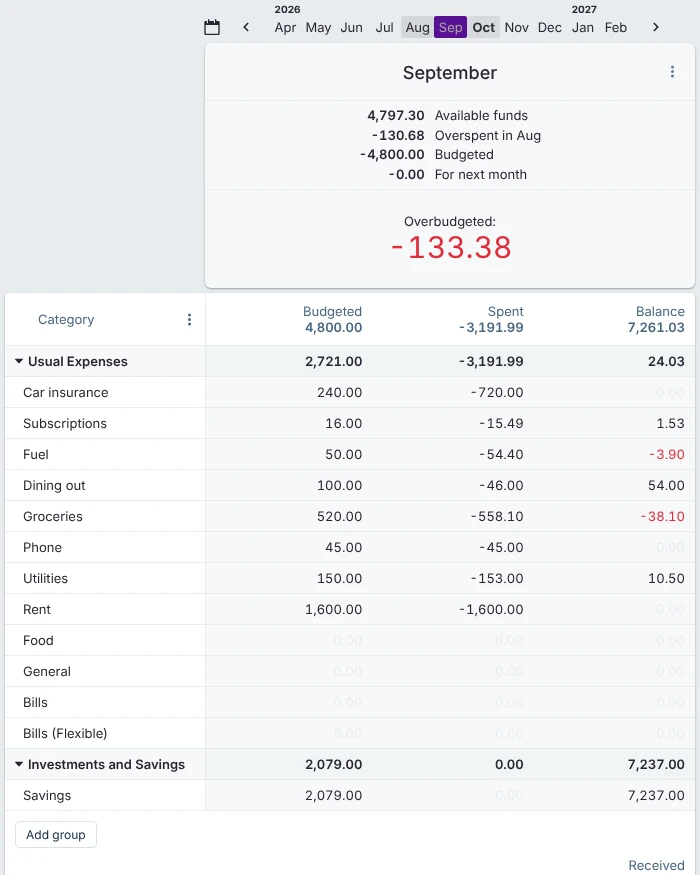
Actual Budget 26.10.0 with our made-up demo data, October 2026. The car insurance category paid its $720 bill from three months of $240, and August's overspending came out of September's money.
Imports were clean: a CSV file of 25 card transactions mapped its own columns, an OFX file of 17 checking transactions matched the expected balance to the cent, and importing both files a second time offered "Import 0 transactions".
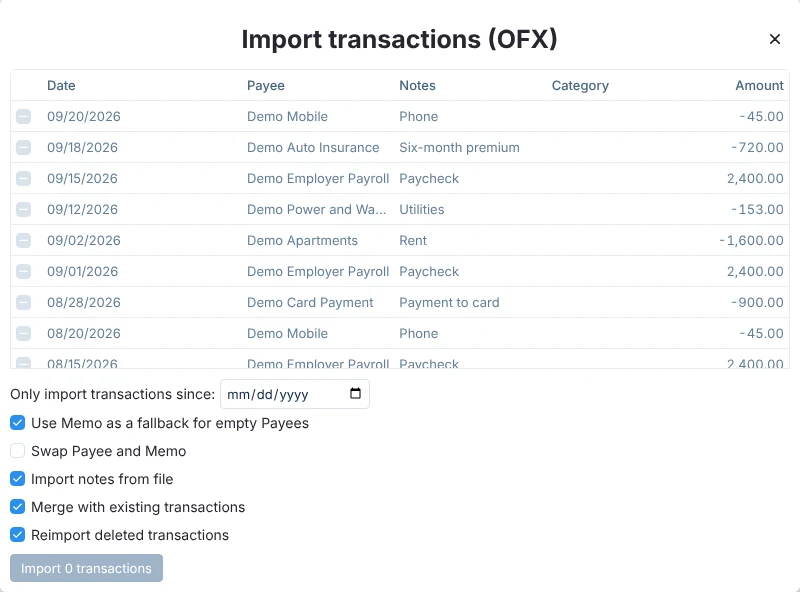
The second import of the same OFX file in Actual Budget, October 2026: every transaction was recognized as already imported.
Actual's export is the most complete here. Settings, Export data produced a zip holding the whole budget as a database, and importing that zip restored an identical copy, with the same balances and months. Because the app is open source, that file stays usable whatever happens to the project.
What it asks of you is setup. To use Actual on a phone and a computer you need a server, your own or one rented from PikaPods, which Actual's PikaPods page put at about $1.50 a month as of November 2025. There are no native phone apps; the web app worked at phone width in our test. US bank sync goes through SimpleFIN, which charges $15 a year (Actual's bank sync documentation). Separate logins for a partner need an outside sign-in provider configured on the server (Actual's multi-user documentation). Rented hosting plus SimpleFIN comes to about $33 a year.
That server is what puts YNAB first. Our first pass of scoring put Actual first, 7.9 to 7.8. We then added a 3-point deduction under Platforms and setup for any app you must run or rent your own server for, because for most households that is a real cost in time and upkeep, and only Actual is affected. It is a judgment made after seeing the order, and it decides first place: if running a server doesn't bother you, Actual is the better pick. The scoring sheet shows both orders.
Monarch
Monarch ranks third and takes "Best for couples" because it is the only app here built to show a couple's money as yours, mine and ours. Shared Views let you mark each account and transaction as belonging to you, your partner or both, and filter by owner, and you can assign a transaction to a household member to review (Monarch's review guide). Every household member gets their own login at no extra cost. The award rests on those ownership views: on our Couples and sharing score, Monarch ties YNAB and Lunch Money at 8.
The same design is its limit for some couples: "You cannot hide bank accounts or transactions" from other household members (Monarch's couples guide). The owner filters also stop short of the budget: Monarch says they "are not available in Budgets, Recurring, Goals, or Investments", which always show the whole household. So you can see who spent what, but you can't keep a personal budget beside the shared one. If either of you needs a private account or budget, YNAB, Lunch Money or Honeydue fits better.
Monarch matches YNAB on budgeting tools: rollover, a "left to budget" figure for zero-based budgeting, goals with planned monthly contributions, recurring bills and Pay Down goals for debt. It connects banks through Plaid, Finicity and MX and lets you switch providers bank by bank (Monarch's data providers). It loses to YNAB on two counts: it imports only CSV files, and it exports transactions and balances but not your budget. Your transaction history stays downloadable after you stop paying.
Monarch Core costs $99.99 a year or $14.99 a month; with the code WELCOME, new users pay $69.99 for the first year, then $99.99 (Monarch's pricing). Monarch Plus, launched on April 20, 2026 at $199.99 a year, adds forecasting and business and investment tools that this ranking doesn't score. The 7-day trial asks for a payment method.
Lunch Money
Lunch Money ranks fourth, and it suits households that budget on a computer and want several people on one budget: any number of collaborators can join with their own logins, and only the budget's admin pays (Lunch Money's collaborators guide). One subscription also allows unlimited separate budgets, so a personal budget can sit apart from a shared one, and every transaction keeps a change history. It ties Monarch exactly on total score and is listed after it because Monarch scores higher on budgeting tools.
Its budgeting covers rollover, a zero-based option and sinking funds (Lunch Money's budgeting FAQ); goals are listed as coming soon. Plaid is its only bank link, and CSV and PDF statement import cover the rest. The iPhone and Android apps are companions to the web app. Lunch Money's own pages refused our automated checks, so its price comes from search engines' copies of them in October 2026: $10 a month, or a yearly price you set yourself, which Lunch Money's January 2026 announcement says starts at $60 for anyone joining after March 15, 2026. There is no free plan, only a 30-day trial. If you cancel, your data is deleted within 48 hours (Lunch Money's billing guide), so export first.
EveryDollar
EveryDollar ranks fifth and suits zero-based budgeters who want to pay nothing: the free plan gives you the full monthly budget with unlimited budget items, though you enter transactions yourself. Funds that roll over cover savings goals (EveryDollar's funds guide), and Premium, at $79.99 a year or $17.99 a month, adds bank connections through Mastercard Connect and Plaid, paycheck planning and a debt payoff tracker (EveryDollar Premium).
It scores lower on data and sharing. "Importing files is not supported", and Premium exports only one month at a time (EveryDollar's export guide). A spouse can join with their own email, but the household is meant for two and there is nothing private within it. The free plan carries upgrade ads, and the app promotes other Ramsey products.
Goodbudget
Goodbudget ranks sixth and suits envelope budgeters, including people who would rather upload a bank file than link an account. It has every budgeting tool we score: envelopes whose balances carry over, annual and goal envelopes you fill each month, scheduled transactions and debt accounts. It accepts QFX, OFX and CSV uploads even on the free plan.
It falls behind on sharing: a partner signs in with the same email and password on their own phone, so there is no separate login or privacy between you. The free plan allows 10 regular and 10 more envelopes, one account and a year of history; Premium is $10 a month or $80 a year and adds bank sync through Plaid (Goodbudget's plan changes). Goodbudget's pricing and help pages refused our automated checks, so those details come from its August 2024 announcement and search engines' copies of its help pages. Its privacy policy says it doesn't sell or rent your information.
Quicken Simplifi
Quicken Simplifi ranks seventh and suits people who think in terms of what's left to spend after bills and savings. Its Spending Plan subtracts bills and savings goals first and supports rollover on planned spending, and bank connections run through several providers in the US and Canada.
Three things hold it back. The price is $3.99 a month for the first year and then $6.99 a month, billed yearly, so $47.88 becomes $83.88, on an offer that ends November 13, 2026 (Simplifi's pricing). Sharing covers one other person, with all-or-nothing access (Simplifi's sharing guide). And Quicken's California privacy notice says it may share personal information with credit card and bank partners to offer you their products, which it treats as a sale you can opt out of.
PocketGuard
PocketGuard ranks eighth, and it suits someone budgeting alone who wants rollover on every category, savings goals and a debt payoff plan (PocketGuard's paid plan overview). PocketGuard Premium costs $74.99 a year or $12.99 a month, or $149.99 once for life. It also has a second bank data provider, Plaid, for banks that fail on its main one. It ties Honeydue at 5.7 and is listed first because it scores higher on budgeting tools.
It scores poorly for couples, who "sign in with the same login and password" (PocketGuard's sharing guide), and for data: its privacy policy lets it use your financial data to show you offers from marketing partners. Its pricing page offers a 7-day trial and no free plan; The Penny Hoarder reported in 2026 that a limited free version was unlocked by email after it declined the trial, but you can't choose it up front.
Honeydue
Honeydue ranks ninth and takes "Best free for couples": it costs nothing, each partner has their own account, and for each account you choose whether your partner sees balances and transactions, balances only or nothing, and you can hide a single purchase (Honeydue's guide to what your partner sees). You can comment on each other's transactions. It earns from optional tips of $1 to $10 a month.
As a budget it is basic: monthly limits per category and bill reminders, with no rollover or goals. It runs only on iPhone and Android, we found no export, and its privacy policy, last updated in 2020, allows ads. Most of its help articles are dated 2019, which suggests little recent development; that isn't in the score, but it is a reason to keep your own records.
Rocket Money
Rocket Money ranks tenth and is best known, and best used, for finding and canceling subscriptions. Its free plan tracks subscriptions and bills with limited budgets, and Premium, at a price you choose that typically runs $7 to $14 a month, adds unlimited budgets and savings goals (Rocket Money's pricing article). A partner gets their own login on one Premium membership.
As a budgeting app it trails: no rollover, Plaid as the only bank link, and you can't use it at all without a checking account Plaid supports (Rocket Money's help article). Its privacy notice says it shares your data with other financial companies for joint marketing, which you can't limit, and lets affiliates such as Rocket Mortgage market to you. Bill negotiation costs 35% to 60% of the first year's savings.
Copilot Money
Copilot Money ranks last, and it suits one person on an iPhone and a Mac. Its budgets roll over, its savings goals show what you need to put aside each month, and it connects US banks through Plaid, Mastercard, MX and Akoya (how Copilot gets your data). Copilot runs on the web as well as on Apple devices, but there is no Android app.
Its low score comes from price and sharing. There is no free plan, it costs $95 a year, and a partner can only sign in to your account through a forwarded sign-in link, with "full control" (Copilot's partner guide). There is no general file import, and we found no zero-based view.
What many answers get wrong
We asked four AI models (GPT, Claude, Gemini and Perplexity, through their APIs with web search on) four versions of this question in October 2026. YNAB was named in 14 of the 16 answers and Monarch in 12. These are the facts the answers most often missed or got wrong:
- Empower is not a budgeting app in the usual sense. Two answers called it the best free budgeting app. Its budget tool sets one monthly spending target, not a budget per category (Empower's budget planner). It is a good free tracker.
- Monarch now has two plans. Monarch Plus, launched on April 20, 2026, costs $199.99 a year. Core is the $99.99 plan most answers describe.
- Quicken Simplifi renews at $83.88 a year, not the $48 to $70 one answer gave. The $3.99-a-month price is for the first year only.
- Goodbudget has no "Plus" plan. One answer gave a Plus plan at $8 a month or $70 a year; Goodbudget's paid plan is Premium, at $10 a month or $80 a year.
- PocketGuard's pricing page offers no free plan. One answer, citing WalletHub, said you can add transactions to PocketGuard by hand for free; the pricing page shows a 7-day trial, then $74.99 a year.
- Rocket Money's Premium typically costs $7 to $14 a month, by Rocket Money's own pricing article, not $4 to $12.
- Copilot Money has a full web app. One answer called it Apple-only with limited web access. It has no Android app.
Which one should you choose?
- If you want one answer: YNAB. Use the 34-day trial to see whether planning the money you have now suits you.
- If you want YNAB's approach for free and can run a server: Actual Budget. It can import a YNAB budget, which we didn't test.
- If you're a couple who share everything: Monarch, for its yours-mine-ours views. If one of you needs a private account, choose YNAB, or Honeydue if it has to be free.
- If you'll enter transactions by hand to avoid paying: EveryDollar's free plan has unlimited categories; Goodbudget's free plan adds file upload but caps envelopes.
- If you don't want to link a bank at all: YNAB, Actual Budget and Goodbudget import both CSV and OFX or QFX bank files, and EveryDollar's free plan works by hand. Rocket Money won't work without a linked checking account.
- If you mainly want to cut subscriptions: Rocket Money's free plan, alongside a budgeting app.
- If you might leave one day: pick an app that exports your budget as well as your transactions. YNAB and Actual Budget do.
How we scored
We used Actual Budget hands-on and scored the other ten apps from documents. In October 2026 we read each app's US pricing page, help center, privacy policy and app store listing, and scored each one against anchors written before scoring. We never connected a real bank account: the Actual Budget test used a made-up household's transactions in CSV and OFX files. Ease of use, categorization accuracy and how reliably bank sync works are not scored, because we found no independent test with a published method for this field and wouldn't connect real accounts to measure them. Where an app's pages refused our checks (Lunch Money's pricing and Goodbudget's help pages), the facts come from search engines' copies and are labeled. How we scored the best budgeting apps lists every score with its source, including the server deduction we added after a first pass put Actual Budget first.
Questions people ask
Is YNAB worth $109 a year? If you will use it every week, it is the most complete budget here, and it is the only paid app that exports your budget as well as your transactions. If you won't, EveryDollar's free plan or Actual Budget cost nothing. Try YNAB's 34-day trial before you pay.
YNAB or Monarch? YNAB if you want to budget the money you have now and keep a personal plan private; Monarch if you're a couple who want one view of every account, marked yours, mine or shared. The two score the same on budgeting tools; YNAB is ahead on file import and exports.
What is the best free budgeting app? EveryDollar's free plan, if you will enter transactions by hand; Actual Budget, if you can run your own server; Honeydue, if you're a couple who want to share spending without paying, though its budgeting is basic.
What happens to my data if a budgeting app shuts down? You keep what you exported. When Mint closed in March 2024, its users moved to Credit Karma, but their monthly budgets didn't. Every app here except Honeydue exports transactions as CSV; only YNAB and Actual Budget also export your budget, and only Actual's file stays usable without the company.
How the score is built
Weighted average of the criteria below, out of 10
- Budgeting tools 25%
- Category budgets (2), rollover of money left or overspent (2), goals or sinking funds with a monthly amount (2), zero-based or envelope budgeting (1.5), upcoming bills and recurring transactions (1.5) and a debt payoff plan (1), from each app's help center, on its main paid plan.
- Price and free plan 20%
- What the free plan allows (up to 4) plus the regular yearly price for a household after any first-year discount (up to 6), from US pricing pages in October 2026.
- Bank connections and imports 15%
- Automatic US bank sync included in the price (4), more than one sync provider (2), CSV and OFX or QFX file import (2), manual accounts (1) and sync outside the US (1), from each app's documentation.
- Couples and sharing 15%
- A login for each person at no extra cost (4), views of whose account is whose (2), private accounts or budgets (2), sharing with more than one other person (1) and a record of changes or comments (1).
- Platforms and setup 10%
- A web or computer app (3) and native iPhone and Android apps (3.5 each), minus 3 if you must run or rent your own server to use it on more than one device.
- Your data and privacy 15%
- CSV export of all transactions (3), budget export (2), open source or a copy that outlives the company (2), and how the company makes money from you (3), from export guides and privacy policies.
| Tool | Budgeting tools25% | Price and free plan20% | Bank connections and imports15% | Couples and sharing15% | Platforms and setup10% | Your data and privacy15% | Score |
|---|---|---|---|---|---|---|---|
| YNAB | 10.0 | 2.0 | 10.0 | 8.0 | 10.0 | 8.0 | 7.8 |
| Actual Budget | 9.0 | 9.0 | 6.0 | 5.0 | 3.5 | 10.0 | 7.6 |
| Monarch | 10.0 | 2.0 | 9.0 | 8.0 | 10.0 | 6.0 | 7.4 |
| Lunch Money | 9.0 | 4.0 | 7.0 | 8.0 | 10.0 | 7.0 | 7.4 |
| EveryDollar | 10.0 | 6.0 | 7.0 | 4.0 | 10.0 | 4.5 | 7.0 |
| Goodbudget | 10.0 | 5.0 | 7.0 | 1.0 | 10.0 | 6.0 | 6.6 |
| Quicken Simplifi | 7.5 | 3.0 | 9.0 | 4.0 | 10.0 | 4.0 | 6.0 |
| PocketGuard | 8.5 | 3.0 | 8.0 | 1.0 | 10.0 | 4.0 | 5.7 |
| Honeydue | 3.5 | 10.0 | 6.0 | 7.0 | 7.0 | 1.0 | 5.7 |
| Rocket Money | 5.5 | 5.0 | 5.0 | 4.0 | 10.0 | 4.0 | 5.3 |
| Copilot Money | 7.5 | 2.0 | 7.0 | 1.0 | 6.5 | 6.0 | 5.0 |
Also considered: 10 tools we left out
- Empower Personal Dashboard
- Its budget tool sets one monthly spending target rather than a budget for each category, so it fails our first must-have. It is a good free net-worth and spending tracker, which is what most answers recommending it describe.
- Mint
- Intuit closed Mint in March 2024 and moved users to Credit Karma, which dropped monthly budgets and custom categories.
- NerdWallet's app
- Named once in our sample of AI answers, as a free spending tracker. We scored apps whose main job is a monthly budget.
- Fidelity Full View
- A dashboard inside Fidelity's website for people with a Fidelity login, not a stand-alone budgeting app.
- Splitwise and Tandem
- Apps for splitting shared bills, not for budgeting.
- Tiller and spreadsheet templates
- Tiller feeds your bank transactions into your own Google Sheets or Excel spreadsheet, and templates such as Aspire are spreadsheets too, so the budget is one you build and maintain rather than an app's features.
- Quicken Classic
- Quicken's desktop finance software. Quicken Simplifi is Quicken's budgeting app, and it is scored.
- WalletHub
- Named once in our sample of AI answers, for free manual entry. WalletHub's app is built around free credit scores and credit monitoring, and the company earns from the credit card and loan offers it shows, so budgeting is one part of a credit app rather than its main job.
- Origin
- None of our AI answers recommended it; one cited its blog. Origin is an all-in-one planning app built around an AI financial advisor, investing, forecasting and estate planning, with budgeting as one part.
- Zeta
- Acorns bought Zeta's assets in June 2025 and moved its customers to Acorns' own benefits, and we found no current way for a new user to sign up for Zeta itself.